
잡다한 위젯들
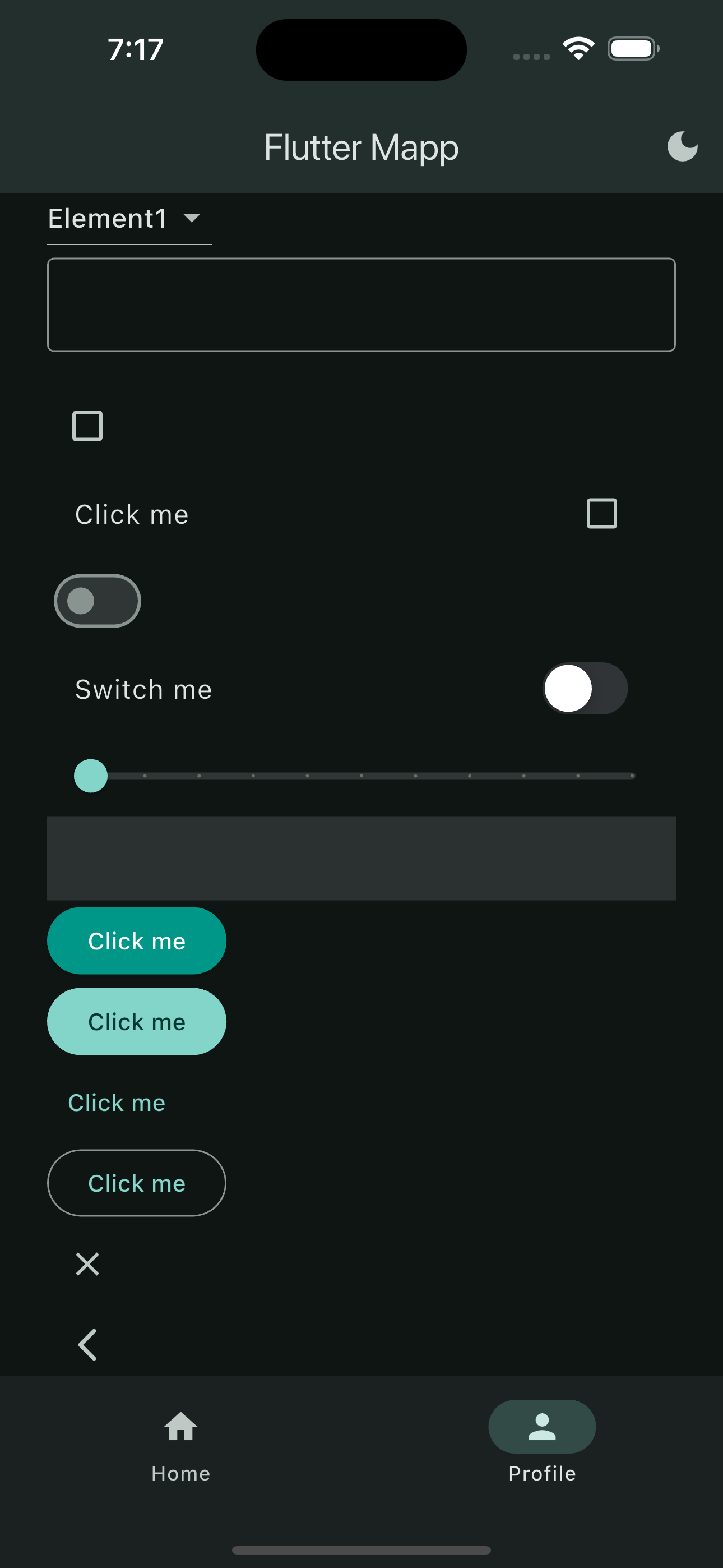
import 'package:flutter/material.dart';

class ProfilePage extends StatefulWidget {
  const ProfilePage({super.key});

  @override
  State<ProfilePage> createState() => _ProfilePageState();
}

class _ProfilePageState extends State<ProfilePage> {
  TextEditingController controller = TextEditingController();
  bool? isChecked = false;
  bool isSwitched = false;
  double sliderValue = 0.0;
  String? menuItem = 'e1';

  @override
  Widget build(BuildContext context) {
    return SingleChildScrollView(
      // Scrollable 한 창
      child: Padding(
        padding: const EdgeInsets.all(28.0),
        child: Column(
          crossAxisAlignment: CrossAxisAlignment.start,
          children: [
            DropdownButton(
              value: menuItem,
              items: [
                DropdownMenuItem(value: 'e1', child: Text('Element1')),
                DropdownMenuItem(value: 'e2', child: Text('Element2')),
                DropdownMenuItem(value: 'e3', child: Text('Element3')),
              ],
              onChanged: (value) {
                setState(() {
                  menuItem = value;
                });
              },
            ),
            TextField(
              controller: controller,
              decoration: InputDecoration(border: OutlineInputBorder()),
              onEditingComplete: () => setState(() {}),
            ),
            Text(controller.text),
            Checkbox(
              tristate: true,
              value: isChecked,
              onChanged: (bool? value) {
                setState(() {
                  isChecked = value;
                });
              },
            ),
            CheckboxListTile(
              tristate: true,
              value: isChecked,
              title: Text('Click me'),
              onChanged: (bool? value) {
                setState(() {
                  isChecked = value;
                });
              },
            ),
            Switch(
              value: isSwitched,
              onChanged: (bool value) {
                setState(() {
                  isSwitched = value;
                });
              },
            ),
            SwitchListTile.adaptive(
              // ios 방식 (adaptive)              title: Text('Switch me'),
              value: isSwitched,
              onChanged: (bool value) {
                setState(() {
                  isSwitched = value;
                });
              },
            ),
            Slider(
              max: 10.0, // 슬라이더 최대 크기
              divisions: 10, // 정수화
              value: sliderValue,
              onChanged: (value) {
                setState(() {
                  sliderValue = value;
                });
                print(value);
              },
            ),
            InkWell(
              // GestureDetector를 써도 똑같은데 눌렀을때 반응을 보고 싶으면 InkWell을 사용
              onTap: () {
                print('Image Selected');
              },
              child: Container(
                height: 50,
                width: double.infinity,
                color: Colors.white12,
              ),
            ),
            ElevatedButton(
              onPressed: () {},
              style: ElevatedButton.styleFrom(
                // style 수정할땐 요러케 수정하면된다
                backgroundColor: Colors.teal,
                foregroundColor: Colors.white,
              ),
              child: Text('Click me'),
            ),
            FilledButton(onPressed: () {}, child: Text('Click me')),
            TextButton(onPressed: () {}, child: Text('Click me')),
            OutlinedButton(onPressed: () {}, child: Text('Click me')),
            CloseButton(),
            BackButton(),
          ],
        ),
      ),
    );
  }
}
Button 종류로는 뭐가 있고, Slider 있고, Switch있고 등등, setState로 어떻게 입력 받고, Scrollable창은 어떻게 생성하고 style을 고칠땐 어떻게? widget.styleFrom(color: …) 방식으로 고치고 등등
어차피 세부적인 위젯들 기억 못하니까 대략적으로 이런 느낌인것만 인지하고 필요한게 있을때 검색해서 적용하도록 하자
HERO 위젯
신기한 위젯이다. 태그를 달아 flutter에서 각 페이지에서 해당 hero 위젯의 태그를 인식하고 자연스러운 애니메이션으로 위젯을 연결해준다.